How Human-in-the-Loop Can Save Agents from Rogue Actions?
Today, let's continue our discussion on LangGraph practices. This time, we're talking about human-in-the-loop. After all, no matter how intelligent an agent is, it's still prone to pulling "rogue moves" — like fabricating data or making decisions beyond its authority. human-in-the-loop is essentially installing a "brake" on the agent, allowing humans to step in and make decisions at critical moments.
In this article, we'll start from the basic concepts, clarify how it differs from multi-turn conversations, then implement this functionality using LangGraph, and see how it's applied in practice in our TinyCodeBase project.
What is human-in-the-loop?
The core idea of Human-in-the-Loop (we'll use the term human-in-the-loop consistently) is to enable machines to actively collaborate with humans during task execution, rather than charging ahead blindly on a single path.
It's not about waiting for the AI to complete its entire workflow before giving it a "thumbs up" or "thumbs down." Instead, it proactively pauses at high-risk, error-prone critical nodes, allowing humans to confirm decisions. Only after receiving human "green light" can the AI continue executing the subsequent workflow.
"Human-in-the-loop" in coding assistants — you use it every day
In fact, the coding assistants that many programmers can't live without nowadays (like Cursor, Claude Code) have built-in, typical human-in-the-loop logic.
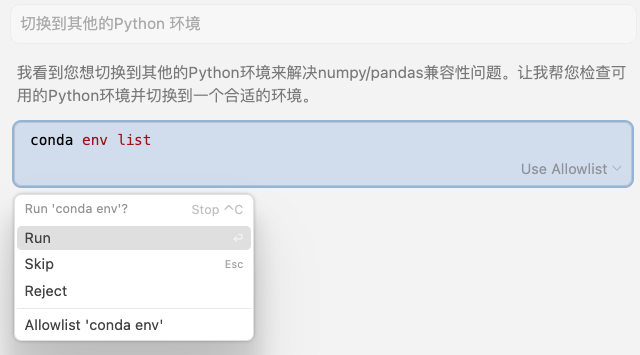
Take the "generate and execute Shell commands" feature for example — it never "takes matters into its own hands" to directly operate your computer. Instead, it obediently pauses and waits for your decision:
You can choose to execute once, execute directly without further prompts, or reject execution.
Cursor Human-in-the-Loop Example
Claude Code Human-in-the-Loop Example
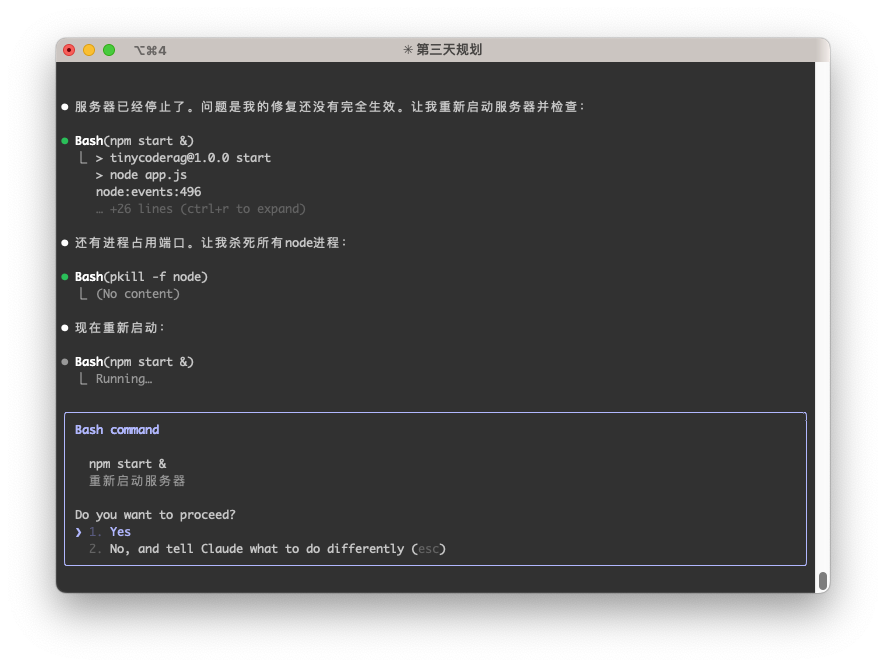
Of course, you can also choose to disable this safety lock and let the coding assistant automatically execute all commands. However, you also need to assume certain risks — theoretically, the coding assistant could perform any unexpected operation.
For example, Claude Code provides the --dangerously-skip-permissions parameter. But the official documentation also gives a serious warning:
"This is dangerous and may result in data loss, system corruption, or even data leakage... It's recommended to use this feature in containers without internet access."
The risks are self-evident.
How is it different from multi-turn conversations?
When I first started, I often confused human-in-the-loop with multi-turn conversations — after all, both seem to involve humans interfering with AI in a series of interactions. But their core difference lies in control:
- Multi-turn conversations: AI asks follow-up questions to better understand your intent — control is with AI.
- Example: You ask "Can I go to the park tomorrow?", AI follows up with "Which city are you in?" — the purpose is to complete the information.
- Human-in-the-loop: AI pauses before executing a critical action, waiting for your decision — control is with humans.
- Example: AI is about to help you buy park tickets, it pauses and asks "Confirm payment of 50 yuan?" — the purpose is to confirm the decision.
The permissions involved in human-in-the-loop are often more sensitive, and the cost of errors is much greater. Errors in multi-turn conversations at worst result in inaccurate information, while errors in human-in-the-loop could lead to system crashes or empty wallets.
Implementing human-in-the-loop in LangGraph
Alright, enough theory. Let's write some code! Let's see how to implement human-in-the-loop in LangGraph.
LangGraph provides a key function interrupt() that can pause the workflow at any node in the graph (Graph), waiting for external input (that is, us humans).
The official tutorial example treats "requesting human help" as a tool, but let's create a more practical scenario: provide the Agent with a search tool, but each call must be confirmed by us, just like Claude Code does.
First, we define a search function that requires human confirmation:
def search_with_confirmation(query: str) -> str:
    """Use Tavily search, but requires human confirmation to execute the search."""
    confirmation = interrupt({"query": query})
    if not confirmation.get("approved", False):
        return "Search cancelled by user."
    return tavily_search(query)
First, we define a search_with_confirmation function that accepts a query parameter, then pauses the workflow through the interrupt() function, waiting for human input.
The human input result will be parsed and returned according to the confirmation structure.
If the human inputs cancel, it returns Search cancelled by user., otherwise it continues executing the search.
Next, let's combine this tool with the Agent to form a complete workflow.
# ... (omitted State definition and LLM initialization) ...
tools = [search_with_confirmation]
llm_with_tools = llm.bind_tools(tools)

def chat_node(state: State):
    result = llm_with_tools.invoke(state["messages"])
    # Ensure only one tool call
    assert len(result.tool_calls) <= 1
    return {"messages": [result]}

graph.add_node("chat", chat_node)
graph.add_node("tools", ToolNode(tools))

graph.add_edge(START, "chat")
graph.add_conditional_edges(
    "chat",
    tools_condition,  # Routes to "tools" or "__end__"
    {"tools": "tools", "__end__": "__end__"}
)
graph.add_edge("tools", "chat")
graph.add_edge("chat", END)

app = graph.compile(checkpointer=memory)
The logic in this section is similar to what we've seen before. Note that LangGraph tools execute concurrently by default, and assert len(result.tool_calls) <= 1 ensures only one tool call at a time.
Next, let's write the inference workflow. First, send the user request to the large model. Before the large model calls the tool, the workflow pauses through the interrupt() function, waiting for human input.
Then wait for human input. If the human inputs agree, continue the workflow and the tool returns search results to the large model. If rejected, it returns Search cancelled by user.
The large model then reasons based on the returned content and finally provides an answer.
user_input = "Please help me search for the latest features and tutorials for LangGraph"
config = {"configurable": {"thread_id": "search_demo"}}

# First execution: AI analyzes user request and prepares to call search tool
events = list(app.stream(
    {"messages": [{"role": "user", "content": user_input}]},
    config,
    stream_mode="values",
))

# Wait for actual user input
while True:
    user_input_confirm = input("Please enter (y/n or yes/no): ").strip().lower()
    if user_input_confirm in ['y', 'yes', 'yes', 'agree']:
        approved = True
        break
    else:
        approved = False
        break

human_command = Command(resume={"approved": approved})
# Second execution: Use human-approved result
events = app.stream(human_command, config, stream_mode="values")
This code needs some explanation. After calling the interrupt() function, subsequent logic is suspended and not executed. If we want to resume execution, we must pass a Command object to the agent to inject the human input result.
We can also notice that previously, large model inference called the app.invoke() function, but now it's become app.stream().
Let's briefly list the differences between these two execution methods:
app.invoke (synchronous execution):
- Executes the entire workflow in one go
- Waits for all steps to complete before returning the final result
- Suitable for scenarios that require complete results
app.stream (streaming execution):
- Returns each state change in the workflow progressively
- Can observe the execution process in real-time
- Suitable for scenarios requiring real-time feedback or interaction
This difference is quite important because only app.stream() supports interrupt function calls and workflow resumption. Everyone needs to be careful when writing code.
Finally, let's provide an example of the code execution result:
============================================================
First phase: AI analyzes user request and prepares to search...
============================================================
User: Please help me search for the latest features and tutorials for LangGraph
AI: User needs to search for LangGraph's latest features and tutorials, calling search_with_confirmation function.
AI准备调用工具: [{'name': 'search_with_confirmation', 'args': {'query': 'LangGraph的最新功能和使用教程'}, 'id': 'call_9v1by8xpwx9zwnycg7w1okzq', 'type': 'tool_call'}]
============================================================
Second phase: Waiting for user to confirm search...
============================================================
AI wants to search: 'LangGraph's latest features and tutorials'
Allow this search?
User decision: Agree to search
============================================================
Third phase: Execute search and return results...
============================================================
AI: User needs to search for LangGraph's latest features and tutorials, calling search_with_confirmation function.
AI: Search results:
Title: [2025 Latest] LangGraph from Beginner to Master: The Ultimate Guide to Building AI Agents Step by Step ...
Link: xxxxx
Summary: LangGraph from langgraph.graph import StateGraph, START, END response = llm.invoke(state["messages"]) graph_builder.add_node("chatbot", chatbot_node) graph_builder.add_edge(START, "chatbot")  # Start from entry node...
--------------------------------------------------
Title: LangGraph Official Documentation Translation 1 - Quick Start and Example Tutorials (Chat, Tools, Memory
Link: xxxxx
Summary: May 16, 2025·This guide will show you how to set up and use the pre-built, reusable components provided by LangGraph, designed to help you quickly and reliably build intelligent agent systems. Prerequisites. Before starting this tutorial, please ensure...
--------------------------------------------------
Title: Langgraph tutorials, any source would help. : r/LangChain - Reddit
Link: xxxxx
Summary: Langgraph tutorials, any source would help. : r/LangChain Skip to main contentLanggraph tutorials, any source would help. : r/LangChain Open menu Open navigationGo to Reddit Home r/LangChain A chip A close button Sign InSign Out...
--------------------------------------------------
AI: Found some information about LangGraph's latest features and tutorials for you:
- [2025 Latest] LangGraph from Beginner to Master: The Ultimate Guide to Building AI Agents Step by Step ...
- LangGraph Official Documentation Translation 1 - Quick Start and Example Tutorials (Chat, Tools, Memory
- Langgraph tutorials, any source would help.

These links may contain the detailed information you need. You can click the links to learn more.
The complete runnable code example has been placed in the agent_langgraph_human_in_the_loop.py file in the TinyCodeBase repository. Welcome to explore!
Project Link: (https://github.com/codemilestones/TinyCodeBase/blob/master/agent/agent_langgraph_human_in_the_loop.py)
Summary
Today, we not only clarified the concept of human-in-the-loop, but also implemented it hands-on with LangGraph.
Human-in-the-loop is a very necessary feature in agents. It allows the agent to pause at critical nodes and wait for human decisions, thereby avoiding unexpected losses.
I hope this tutorial helps you better understand the concept of human-in-the-loop and apply it to your practical work.
References
[1] LangGraph Documentation (https://langchain-ai.github.io/langgraph/tutorials/get-started/4-human-in-the-loop)