AI as Your Assistant: Delivering an MVP in 3 Days! A Practical Review of Controllable AI Programming
Friends! Want to try being the boss of AI, letting it serve as your "Product Director" and "Chief Engineer," delivering an MVP product from scratch in just 3 days?
Today, let's dive deep into a new topic: Controllable AI Software Engineering.
In the past year, AI programming tools have emerged one after another, from Cursor, Qoder, Trea to the command-line-based Claude Code — it's simply dazzling. As an experienced programmer, the explosion in productivity driven by AI's increasing maturity excites me, but the anxiety that my self-growth can't keep pace with AI's development also troubles me.
As many predecessors have pointed out, AI is the general trend. Instead of feeling anxious and panicked, or passively accepting it, it's better to actively embrace change and improve work efficiency. This is also my original intention for diving into the large model field and sharing the process with everyone to exchange experiences and grow together.
Today's article will present the entire process from product definition, technology selection to coding and testing, demonstrating through this workflow how to efficiently use existing AI tools to achieve "controllable AI programming."
Sharpen Your Axe: Choose Your AI "Dream Team"
To do good work, one must first sharpen one's tools. Let's first look at what tools are currently suitable for AI programming in AI software engineering.
Considering cost, scenarios, and efficiency, my current main tool combination looks like this:
- Doubao/Kimi (Product Manager): Free, suitable for scenarios that don't require extensive code context. For example, discussing ideas, writing product drafts, technical articles — it's an excellent "product manager."
- Claude Code/Zhipu GLM-4 (Main Coder): Superb code writing capabilities, the core coder in the project. However, domestic users can't use it, which is really frustrating. Fortunately, domestic AI giant Zhipu has stepped up with a monthly coding package. You can choose to purchase Zhipu's coding membership — the lowest tier monthly package is quite sufficient. Domestic users can directly choose Zhipu's coding package with excellent value for money. (My exclusive discount code is at the end for extra savings)
- Cursor/Qoder/Trea (Integrated Development Environment): Cursor has strong IDE integration and Agent capabilities, but the price is high and the network is unstable. Domestic Qoder or Trea are excellent alternatives.
Practical Path for Controllable AI Programming
The following workflow is currently a more mainstream AI programming path. After referencing the experiences of many experts (such as Swedish Ma Gong, Xingchen Insight), I've summarized a golden workflow that works time and again. Now I'm sharing it with you:
- Discuss Requirements: Like communicating with a product manager, first have a thorough conversation with AI about "what to do."
- Define Solution: Then work with the AI engineer to finalize "how to do it," determining the technical route and framework selection.
- Break Down Tasks: This is key to controllability! Break the big goal into a bunch of small tasks, then like a supervisor, have AI complete them one by one.
- Accept Features: AI finishing code doesn't mean the job is done! We need to personally test and accept to truly run the MVP.
Let's discuss in detail the specifics of each step in this workflow.
1. Discuss Requirements, Key Output: Product Requirement Document
This part is very critical and worth investing sufficient time. Your goal should be to describe as clearly as possible what the project content is. Define the scope.
The output of this part is a Product Requirement Document,简称 PRD.
Of course, you don't need to write this document yourself. In the AI era, if you don't have to write it yourself, don't (while ensuring quality). Now I'll give you a PRD prompt that you can use to chat with AI. For this part, I mainly use Doubao to complete it. Since there's no code, just discussing requirements, Doubao does a great job.
hi, I'm preparing to develop xxx functionality, mainly wanting to implement:

Please help me generate a PRD including:
1. Product background and goals
2. User stories and use scenarios
3. Feature requirement list
4. Interaction flow diagram
Using AI to write doesn't mean not spending time — it actually requires spending more time thinking through the product workflow.
2. Define Technical Solution, Key Output: Technical Requirement Document
The next step is writing a Technical Requirement Document,简称 TRD。
What's important in the TRD is deciding our framework selection, database design, interface design. This part mainly imposes implementation detail constraints on AI.
Software Architecture Selection
Unlike single-file code generation, for project-level code, software architecture is very important.
Using a certain technology solution sets the general direction for the entire software architecture and profoundly affects the project development process.
Whether it's a Java service, NodeJs service, or serverless system, as well as frontend framework selection, are all very important.
If not specified, AI will write according to the architecture it encountered most during training.
Database and Interface Design
Besides this, you should also let AI design the database table structure and interfaces well.
No matter what AI designs, it really likes to design user systems. I suggest you remove related generation first. We need to focus on developing core functionality and not get led astray by AI.
At this step, AI also likes to design blindly — designing things too broadly, designing things it's familiar with. We must control its thinking well.
At this time, the role of PRD becomes apparent. PRD lets us always remember what our goal is, so we don't go off track.
If during the process of writing the TRD, you find the PRD unreasonable, you can also go back and modify it.
3. Start AI Programming, Define an MVP Development Plan
This step is relatively fine-grained code generation. Now various AI programming tools do this very well.
First, through a similar prompt, have Claude Code generate a TODOlist.md file.
After our review, we can start having the AI programming tool complete them one by one.
Remember to commit code once after completing each phase.
4. Conduct Code Review and Feature Experience
Finally, it's feature experience and bug fixing. For this part, at minimum, smoke testing should pass.
Smoke testing means basic functionality can run through without getting stuck at some step.
Following this workflow, software product development and iteration can proceed at a very fast pace.
Practice: The Productization Journey of TinyCodeBase
Recently, I hope to productize TinyCodeBase, publishing the project's content. One is to make our projects visible, and the other is to practice AI controllable programming capabilities.
Let's get started.
1. Have a Good Chat with the AI Product Manager About Requirements
I threw my ideas to Doubao according to the PRD prompt above, and quickly got a product draft.
Product draft generated by Doubao
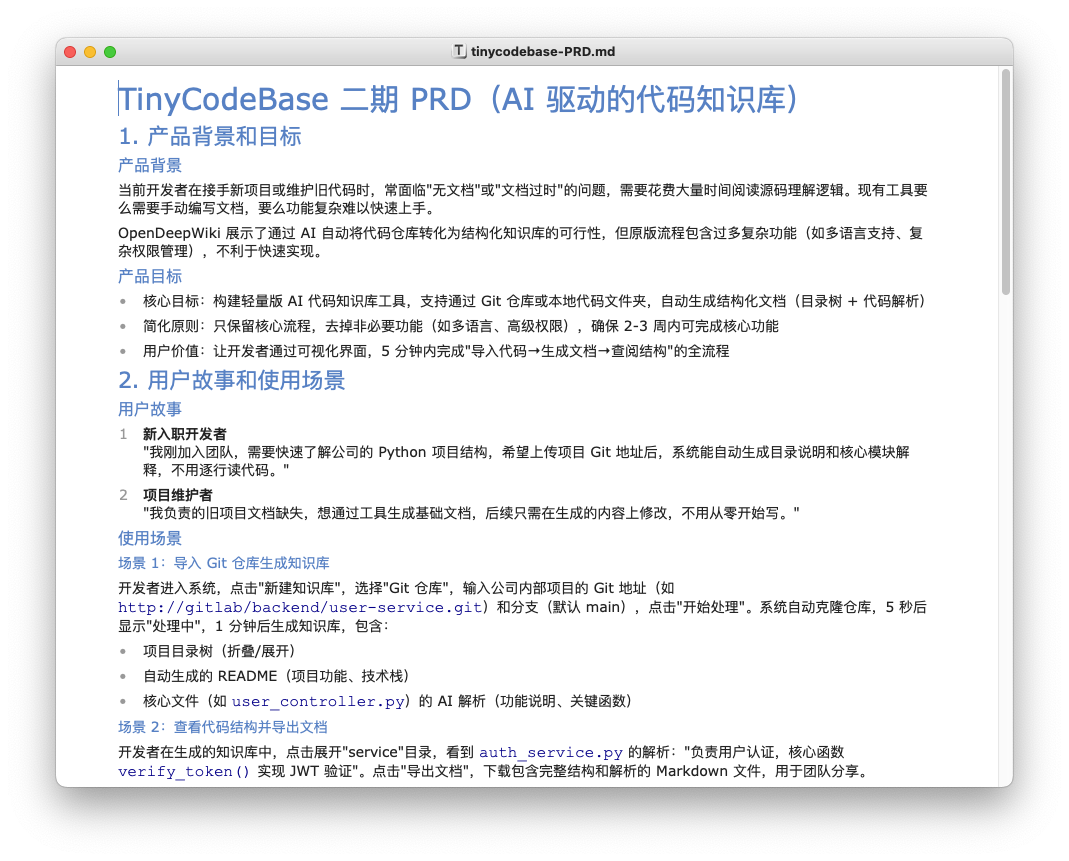
The generated content is too much. If you're interested, you can check it in the repository.
Then I optimized Doubao's product draft, deleting some unimportant parts and highlighting the core content.
For example, I deleted all non-functional requirement parts — currently, we don't need to consider performance, deployment, and other issues.
2. Have a Good Chat with the AI Engineer About the Technical Solution
Next, I used the TRD prompt to have Doubao continue generating the technical draft.
I need a TRD (Technical Requirement Document) to guide the development team in implementing a TinyCodeBase SaaS platform. Please include:
- Technology stack selection (backend NodeJs, frontend using html + js + css), middleware and tools, and reasons for choices
- System architecture design
- Database design (design sufficient fields according to requirements)
- API interface specification
Technical draft generated by Doubao
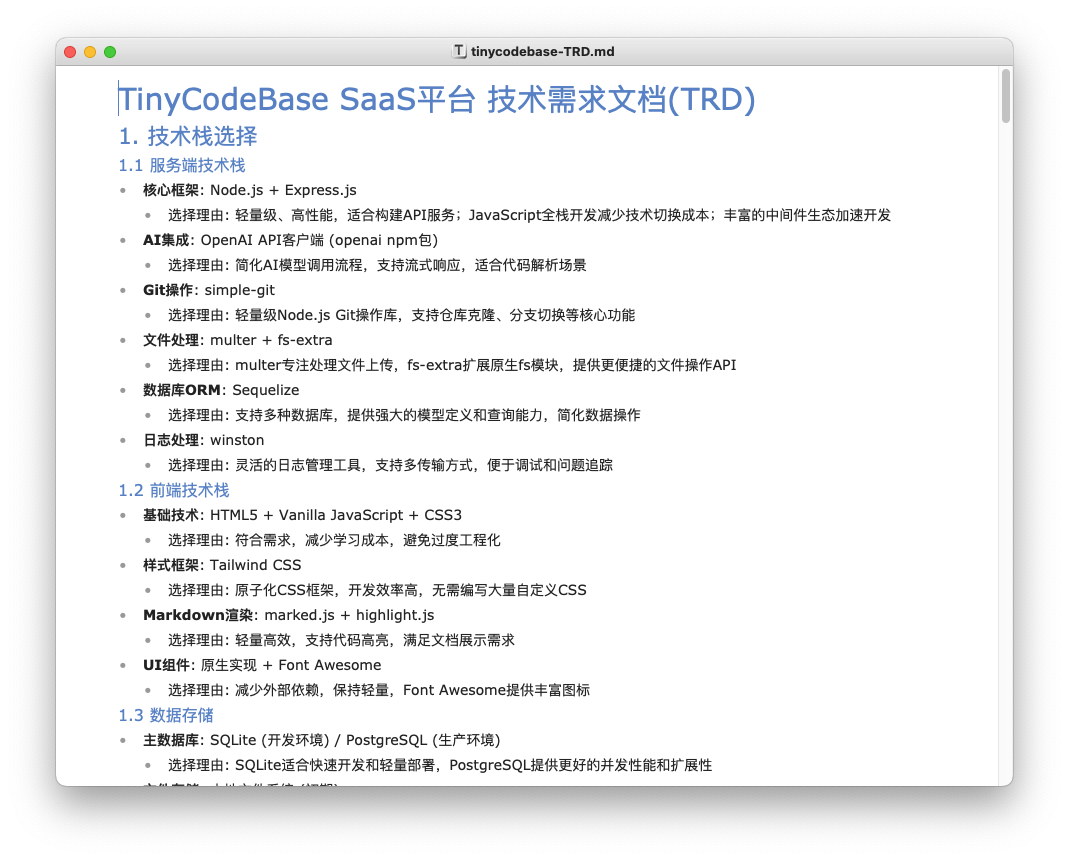
Here's a personal experience I want to share: for startup small projects, the technology stack must be the lowest cost and fastest to get started.
- Backend: Node.js, easy to develop, easy to deploy.
- Frontend: Native HTML + JS + CSS. Because currently AI's mastery of complex frameworks like Vue/React isn't perfect yet. If you don't have rich frontend experience, starting from native is the safest approach.
- Database: SQLite instead of MySQL, in-memory cache instead of Redis. Our core goal is to get it running first!
Also, be cautious with static page deployment platforms like vercel now.
It's best to deploy the project on a server. This is because the cost of implementing functionality on a server is much lower difficulty than server-rendered frontend frameworks.
Frameworks like NextJs are suitable for students with rich frontend experience.
3. List a TODO List for the AI Engineer to Complete One by One
With both PRD and TRD ready, are you tempted to have AI start working directly?
Wait a moment, don't rush. We still need to list a TODO List for the AI engineer to complete one by one.
This step is key to controllable AI programming.
I handed the PRD and TRD to Cursor and had it generate a TODOlist.md.
Based on the content of PRD and TRD, generate an execution plan TODOlist.md for an MVP version that can be completed in three days,
Keep only core content, exclude redundant logic, the todolist should clearly write out every task to be done
TODO list generated by Cursor
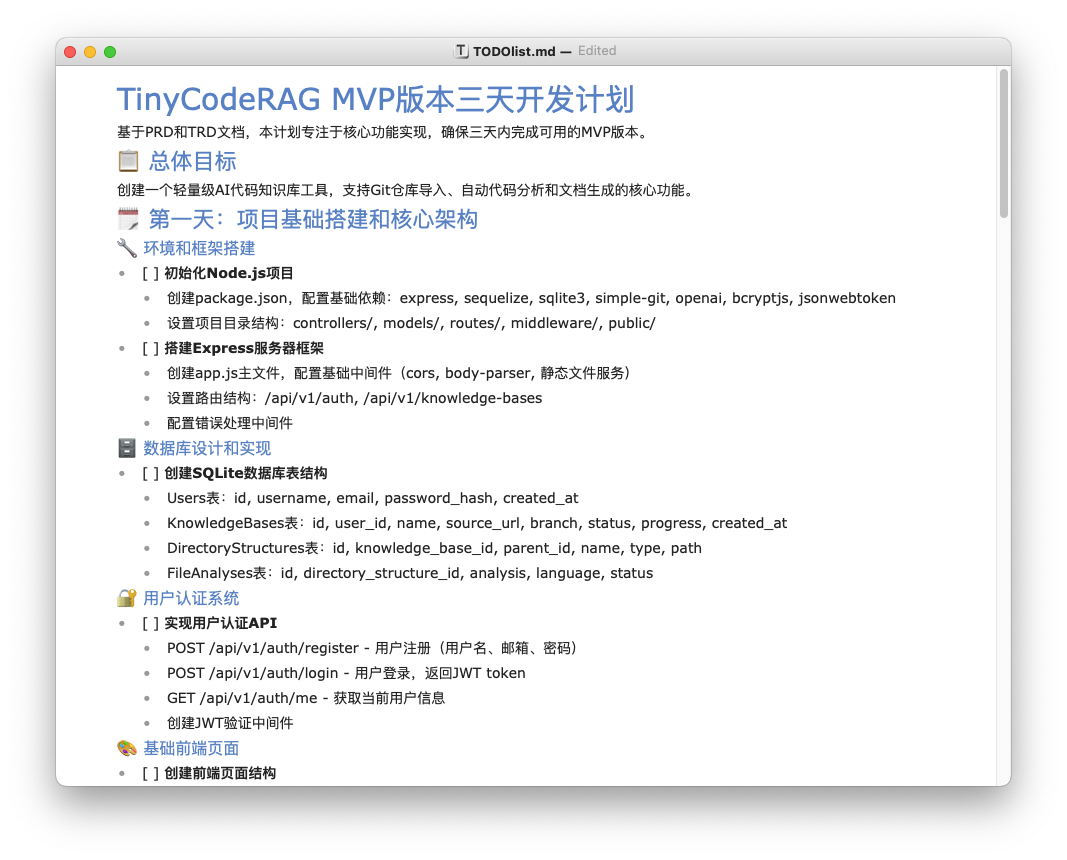
You can see that AI helped us break down the goals one by one, giving a very detailed plan. We just need to follow this plan and have the AI engineer complete them one by one.
Put TODOlist.md in the repository, then tell Cursor: "Start executing the first task."
After completing each phase, normally Cursor will conduct acceptance testing itself. If Cursor doesn't do it, we need to actively request it to conduct acceptance.
After there are no issues, it will automatically mark as completed on the todolist.
At this point, we should look at what Cursor wrote, then commit the code once, and start having Cursor execute the next phase.
Ideally, as the todolist items are completed one by one, our entire project is also completed.
4. Accept Product, Launch Online!
Accept the product — the product must truly work, not just have the code written.
At this point, annoying things arise. The code written by AI may not necessarily run normally.
First, after local deployment, definitely have Cursor print all kinds of logs locally, including behavior logs and error logs.
Now the code written by Cursor can already guarantee no compilation problems, but cannot guarantee functional availability.
This requires us to self-test the product. When encountering errors, promptly tell Cursor the phenomenon, and Cursor will fix it based on the log situation.
If functionality somewhere isn't implemented, also explain it to Cursor. You can have Cursor supplement the logic.
Finally, after smoke testing passes, our MVP version can also be submitted.
Summary: AI Programming is Not Magic, It's Scientific Software Engineering Methods
Today, we walked through the entire process from product concept, technology selection to coding delivery. The core is just two words: controllable.
By breaking down big goals into PRD, TRD, and TODO List, we transformed collaboration with AI from "gacha" into predictable, manageable engineering practice.
This workflow not only let me deliver an MVP in three days, more importantly, it lets developers like you and me truly become masters of AI.
The full practice code from this article has been open-sourced to the TinyCodeBase repository, and the online DEMO has also been deployed here. Welcome to try it out!
If you found this article helpful, or have any thoughts about the project, please don't be stingy with your Star/Fork/Issue combo! Every piece of your feedback is my motivation to continue optimizing~
Finally, I'm attaching the Zhipu coding membership link. Let's go full power together.
(https://www.bigmodel.cn/claude-code?ic=1U7PYF38KN)
Related Links
[1]: TinyCodeBase Repository (https://github.com/codemilestones/TinyCodeBase)
[2]: TinyCodeBase Online DEMO (https://tinycode.codemls.com)
[3]: From PRD to TRD: Complete Guide to Product Documentation Systems in the Large Model Era (https://mp.weixin.qq.com/s/9Acc8evACHgZ6crvoyCM7w)
[4]: Spring Has Arrived for Test-Driven Development: Thoughts on Reading "Modern Software Engineering" (https://mp.weixin.qq.com/s/peSoS3u0FC_Y2xHVWrMYjw)