Deep Research Agent in Practice (Part 2): Building a Basic Research Agent
Hey friends, welcome back to our "Deep Research Agent" practice series!
In the previous article, we explored the core concepts behind Research Agents. Today, we're getting serious—rolling up our sleeves and building our own basic research agent step by step!
Iterating on a product is always exciting, isn't it? This time, we'll not only dive deep into the internal structure of two core workflows, but also package the final result into a complete service with both frontend and backend.
All code has been synchronized in our open-source project Fairy, feel free to use and modify:
https://github.com/codemilestones/Fairy
Ready? Let's start with the final Demo effect, then dive straight into the build details!
Research Agent Demo
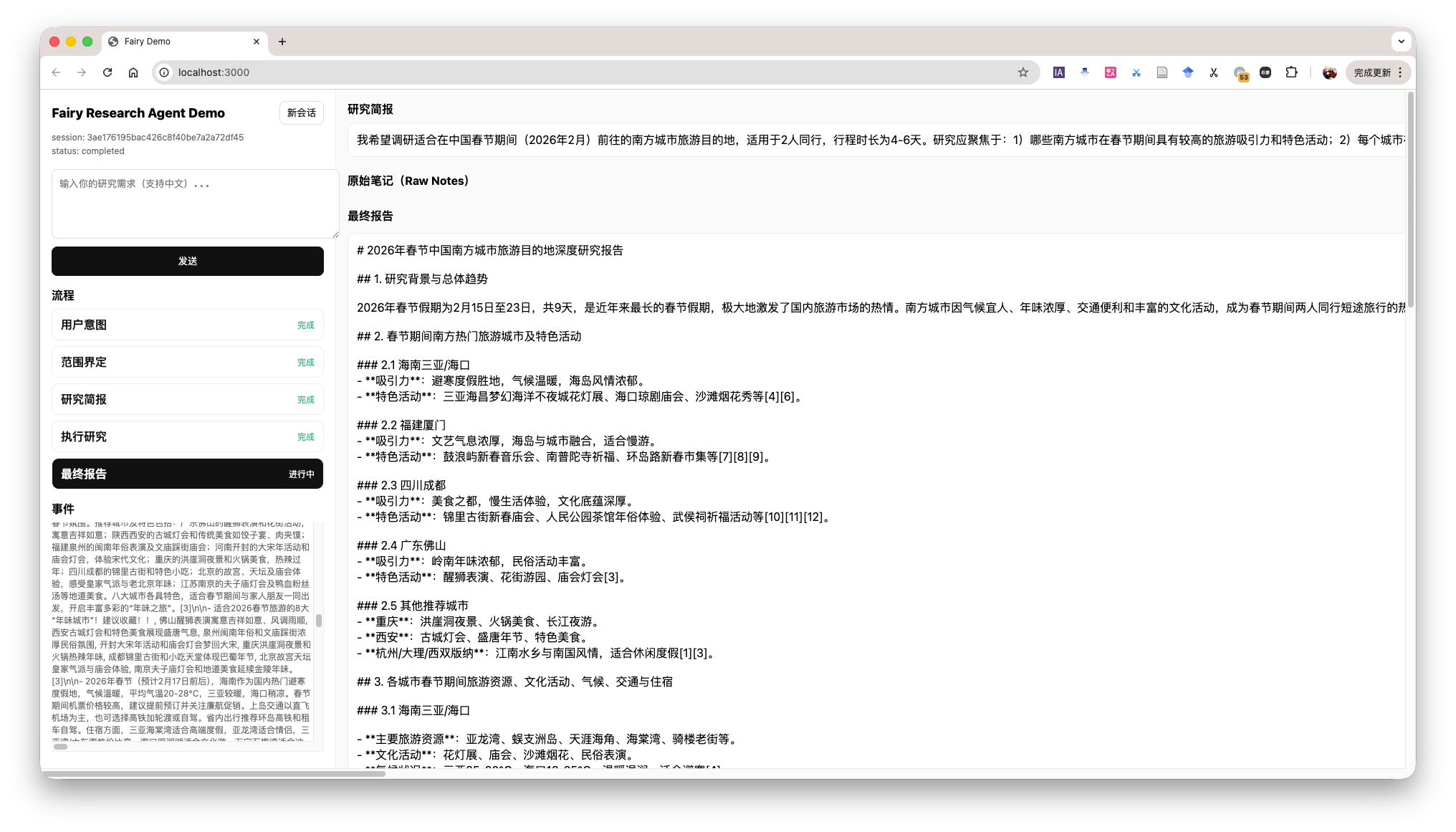
The demo shows the overall workflow of the Agent, while also displaying the current context in the bottom-left corner. This is identical to what the Agent sees, helping us understand the Agent's operation process.
Phase One: Defining Research Scope
Everything has a difficult beginning, and the first step in research is figuring out "what exactly to research." If requirements are vague, subsequent work may be completely wasted. Therefore, our first Agent acts like a rigorous requirements analyst.
Its core goal is: Through continuous dialogue with the user, until the user's research needs are fully clarified.
The core of this phase is building a LangGraph execution graph, which mainly includes two key nodes: clarify_with_user (clarify with user) and write_research_brief (generate research brief).
- Input: User's original research requirements.
- Processing: LLM judges whether information is complete. If incomplete, generate clarification questions; if complete, proceed to next step.
- Output: A structured Research Brief, containing research topic, target audience, list of key questions, etc.
The overall LangGraph execution graph is as follows:
Research Scope Definition Process
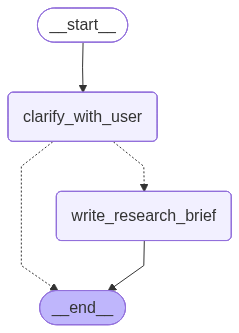
The specific call flow is that the user's conversation information is global and visible to all agents. Each time this graph is called, the Agent chooses to continue clarifying or generate a research background brief.
This phase involves two nodes (clarify_with_user and write_research_brief), so we need to write prompts for both nodes.
Below is the prompt for the clarify_with_user node, which gives the Agent the ability to make choices and judgments. To facilitate learning, I've translated the English prompts from the tutorial into Chinese.
These are the messages exchanged so far from the user requesting the report:

<Messages>
{messages}
</Messages>

Today's date is {date}.

Evaluate whether you need to ask clarification questions, or if the user has already provided sufficient information for you to begin research.
Important note: If you can see in the message history that you have already asked clarification questions, you don't need to ask another question. Only ask another question when absolutely necessary.

If there are acronyms, abbreviations, or unknown terms, please ask the user to clarify.
If you need to ask questions, please follow these steps:
- Collect all necessary information concisely and clearly
- Ensure you collect all information needed to complete the research task in a concise, well-structured manner.
- Use bullet points or numbered lists to improve clarity if necessary. Please ensure Markdown formatting is used and can render correctly if passed to a Markdown renderer.
- Don't ask for unnecessary information or information the user has already provided. If you see the user has provided information, please don't ask again.

Respond in valid JSON format using these exact keys:
"need_clarification": boolean,
"question": "<question asking user to clarify report scope>",
"verification": "<verified information that we will begin research with>"

If you need to ask a clarification question, return:
"need_clarification": true,
"question": "<your clarification question>",
"verification": ""

If you don't need to ask a clarification question, return:
"need_clarification": false,
"question": "",
"verification": "<exact information you will base your research on>"

For verification information without clarification:
- Confirm you have sufficient information to proceed
- Briefly summarize key aspects you understand from their request
- Confirm you will now begin the research process
- Keep the information concise and professional
When the Agent confirms all information is in place, it calls the write_research_brief node and generates a detailed Research Question Brief based on the prompt below.
You will receive a set of messages exchanged so far between you and the user.
Your job is to transform these messages into a more detailed and specific research question that will guide the research.

The messages exchanged so far between you and the user are:
<Messages>
{messages}
</Messages>

Today's date is {date}.

You will return a research question to guide the research.

Guidelines:
1. Maximize specificity and detail
- Include all known user preferences and explicitly list key attributes or dimensions to consider.
- Importantly, all user details must be included in the instructions.

2. Carefully handle undeclared dimensions
- When research quality requires considering other dimensions not specified by the user, acknowledge them as open considerations rather than assumed preferences.
- For example: Instead of assuming "economical choices," say "consider all price ranges unless cost constraints are specified."
- Only mention dimensions that are truly necessary for comprehensive research in that domain.

3. Avoid unnecessary assumptions
- Never fabricate specific preferences, constraints, or requirements not declared by the user.
- If the user hasn't provided specific details, explicitly state this absence.
- Guide researchers to treat unspecified aspects as flexible rather than making assumptions.

4. Distinguish between research scope and user preferences
- Research scope: What themes/dimensions should be investigated (can be broader than what the user explicitly mentions)
- User preferences: Specific constraints, requirements, or preferences (must include only what the user stated)
- For example: "Research coffee quality factors in San Francisco cafes (including bean sourcing, roasting methods, brewing techniques), with primary focus on user-specified taste."

5. Use first person
- Frame the request from the user's perspective.

6. Sources
- If specific sources should be prioritized, specify them in the research question.
- For product and travel research, prioritize links to official or primary websites (e.g., official brand websites, manufacturer pages, or reputable e-commerce platforms like Amazon for user reviews), rather than aggregator sites or SEO-heavy blogs.
- For academic or scientific queries, prioritize links to original papers or official journal publications, rather than review papers or secondary summaries.
- For people, try to link directly to their LinkedIn profiles, or if they have a personal website.
- If the query is in a specific language, prioritize sources published in that language.
Phase Two: Conducting Research and Report Writing
With a clear Research Question Brief as our "battle map," our second Agent—the "Research Executive"—can take the stage.
Its goal is: Based on the research brief, efficiently execute information collection and ultimately produce a structured research report.
The execution graph for this phase is more complex, including llm_call_node (LLM decision node), tool_node (tool calling node), and compress_research (research report generation).
- Input: User's research question.
- Processing: LLM loop decision: Is there enough information to write the report, or do we need to call tools for a new round of search?
- Output: A comprehensive Research Report.
The overall LangGraph execution graph is as follows:
Research Execution and Report Writing Process
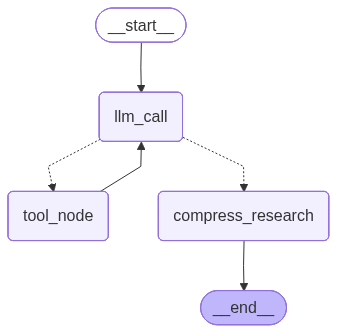
The specific call flow is that the user's research question is passed to the llm_call_node, which then calls the LLM for decision. If the decision result is that more information is needed, the tool_node is called for search. If the decision result is that research can end, the compress_research node is called for research report generation.
From an external perspective, once entering the research question phase, it will loop continuously until the research report is generated. The user cannot intervene in this process.
This phase involves three nodes (llm_call_node, tool_node, and compress_research). We need to write prompts for two nodes: one for llm_call_node and one for compress_research.
Once entering this phase, the Agent works continuously in a loop until producing the final report, with no user intervention possible mid-process.
We equipped the Agent with two powerful tools 🛠️: tavily_search for web search, and think_tool for reflection and planning after searches.
The most important issue in the research phase is: controlling when to stop the research chain—neither too early nor too late.
Therefore, the prompt for llm_call_node clarifies how to use these tools and sets stopping conditions to prevent infinite loops.
Below is the prompt for llm_call_node, which judges whether current information is sufficient, and if not, generates search keywords.
You are a research assistant conducting research on a user-input topic. As context, today's date is {date}.

<Task>
Your job is to use tools to collect information on the user-input topic.
You can use any tools provided to find resources that help answer research questions. You can call these tools serially or in parallel, and your research is conducted in a tool-calling loop.
</Task>

<Available Tools>
You have access to two main tools:
1. **tavily_search**: For conducting web search to gather information
2. **think_tool**: For reflection and strategic planning during research

**Key: Use think_tool after each search to reflect on results and plan next steps**
</Available Tools>

<Instructions>
Think like a human researcher with limited time. Follow these steps:

1. **Read the question carefully** - What specific information does the user need?
2. **Start with broader searches** - Use broad, comprehensive queries first
3. **Pause and evaluate after each search** - Do I have enough for an answer? What's missing?
4. **Run narrower searches as you gather information** - Fill in the gaps
5. **Stop when you can confidently answer** - Don't keep searching for perfection
</Instructions>

<Hard Limits>
**Tool calling budget** (to prevent over-searching):
- **Simple queries**: Use at most 2-3 search tool calls
- **Complex queries**: Use at most 5 search tool calls
- **Always stop**: If correct sources cannot be found after 5 search tool calls

**Stop immediately when**:
- You can comprehensively answer the user's question
- You have 3 or more examples/sources relevant to the question
- Your last 2 searches returned similar information
</Hard Limits>

<Show Your Thinking>
After each search tool call, use think_tool to analyze results:
- What key information did I find?
- What's missing?
- Do I have enough information to answer the question comprehensively?
- Should I continue searching or provide my answer?
</Show Your Thinking>
When the Agent has collected sufficient information, the compress_research node is called. Its prompt guides the LLM on how to summarize scattered web content into a structured, information-rich summary, and provides several high-quality examples.
Examples can be placed according to the style we want, and this content can be adjusted based on actual needs.
Your task is to summarize the raw content of webpages retrieved from web search. Your goal is to create a summary that preserves the most important information from the original webpages. This summary will be used by downstream research agents, so it's critical to keep key details without losing important information.

Here is the raw content of the webpages:

<webpage_content>
{webpage_content}
</webpage_content>

Please follow these guidelines to create your summary:

1. Identify and preserve the webpage's main theme or purpose.
2. Preserve key facts, statistics, and data points critical to the information.
3. Preserve important quotes from reliable sources or experts.
4. If content is time-sensitive or historical, maintain chronological order of events.
5. If present, preserve any lists or step-by-step instructions.
6. Include relevant dates, names, and places critical to understanding the content.
7. Summarize lengthy explanations while keeping core information intact.

When handling different types of content:

- For news articles: Focus on who, what, when, where, why, and how.
- For scientific content: Preserve methodology, results, and conclusions.
- For opinion pieces: Keep main arguments and supporting points.
- For product pages: Preserve key features, specifications, and unique selling points.

Your summary should be much shorter than the original content but comprehensive enough to serve as a standalone information source. The goal is approximately 25-30% of original length, unless content is already concise.

Present your summary in the following format:

{{
   "summary": "Your summary here, structured with appropriate paragraphs or bullet points as needed",
   "key_excerpts": "First important quote or excerpt, second important quote or excerpt, third important quote or excerpt, ...add more excerpts as needed, up to 5"
}}

Here are two examples of good summaries:

Example 1 (News article):
json
{{
   "summary": "On July 15, 2023, NASA successfully launched the Artemis II mission from Kennedy Space Center. This marks the first crewed lunar mission since Apollo 17 in 1972. A four-person team led by Commander Jane Smith will orbit the moon for 10 days before returning to Earth. This mission is a critical step in NASA's plan to establish a permanent human presence on the moon by 2030.",
   "key_excerpts": "Artemis II represents a new era of space exploration, said NASA Administrator John Doe. The mission will test key systems for future long-term stays on the moon, explained Chief Engineer Sarah Johnson. We're not just returning to the moon, we're going forward to the moon, Commander Jane Smith stated at the pre-launch press conference."
}}

Example 2 (Scientific article):
json
{{
   "summary": "A new study published in Nature Climate Change shows that global sea level rise is accelerating faster than previously thought. Researchers analyzed satellite data from 1993 to 2022 and found that the rate of sea level rise has accelerated by 0.08 mm/year² over the past three decades. This acceleration is primarily attributed to melting ice sheets in Greenland and Antarctica. The study predicts that if current trends continue, global sea levels could rise by up to 2 meters by 2100, posing significant risks to coastal communities worldwide.",
   "key_excerpts": "Our findings indicate that sea level rise is accelerating significantly, which has major implications for coastal planning and adaptation strategies, said lead author Dr. Emily Brown. The study reports that melting rates of Greenland and Antarctic ice sheets have tripled since the 1990s. Without immediate and substantial reductions in greenhouse gas emissions, we face potentially catastrophic sea level rise by the end of this century, warned co-author Professor Michael Green."
}}

Remember, your goal is to create a summary that is easy to understand and usable by downstream research agents while preserving the most critical information from the original webpages.

Today's date is {date}.
Process Integration: Creating an End-to-End Research Assistant
OK, after building the two parts above, we now have two independent "expert" Agents: one good at "defining scope," the other skilled at "executing research."
Next comes the most exciting part—how do we integrate them to create an end-to-end automated research workflow? Let's look at the final "combined" execution graph!
Research Agent Process
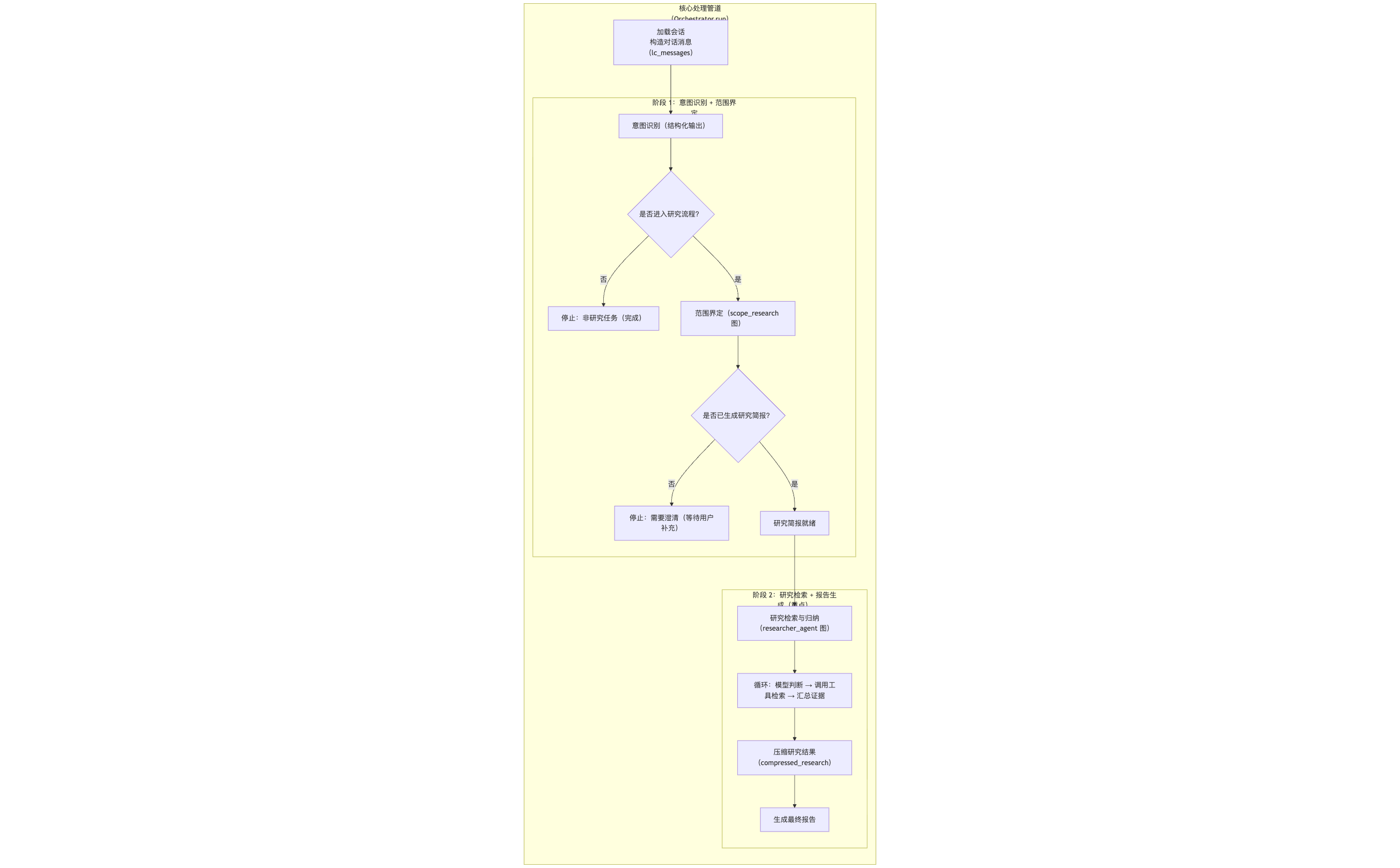
As shown above, the entire process is clearly divided into two phases, executed serially. After the user inputs research requirements, they first enter Phase One. Once a Research Brief is generated, the process automatically enters Phase Two and loops within that phase until the final report is generated.
In Phase One, the user inputs research requirements, and the research scope definition Agent calls the research scope definition graph to generate a research question.
In Phase Two, the research question is passed to the research execution and report writing Agent, which then calls the research execution and report writing graph to generate a research report.
Regarding evaluation system construction, I won't go into detail here. You can refer to the evaluation code in our open-source repository. The core also leverages the LLM's capabilities for evaluation.
Summary and Outlook
At this point, our journey building the core of a basic research Agent comes to a close. But this is just the beginning!
You might be thinking, a single Agent research process might not be comprehensive enough. How can we make it more powerful and intelligent? This is exactly what we'll explore next: Research Supervisor and Multi-Agent Research System! I'll also update these cooler contents to the Fairy open-source repository, ultimately building an ultimate Fairy agent.
Thank you for reading! If this article has given you new insights into building Agents, why not drop by our GitHub repository and give us a Star ⭐
https://github.com/codemilestones/Fairy
Your support is my greatest motivation to keep exploring and sharing! See you in the next article! 👋